AI agents
Run the compliance workflow through tools, not through model recall.
Compliance Platform exposes MCP tools so an AI assistant can classify goods, check duties, screen exposure to EU sanctions against Russia and Belarus, and generate source-linked reports through controlled organization access.
MCP workflow
The agent asks the platform before it answers the user.
A good compliance agent should route the user request to the right tool, return the key finding first, and keep official source references available for verification.
See a real session outputAgent routing rules
Project instructions excerpt
Always use the MCP tools for any CN/TARIC code question.
When a CN code and country are given, run the compliance check immediately.
Highlight review-required warnings and sanctions matches prominently.
Use the HTML report for detailed evidence instead of dumping raw measure lists.
Connector setup
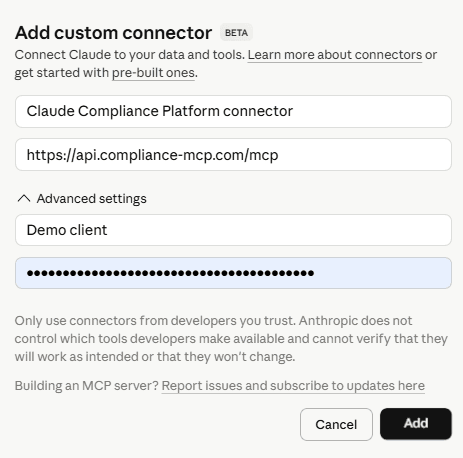
A concrete MCP connector screen for technical reviewers.
This is the kind of setup screen an IT or operations reviewer expects to see: endpoint, organization credential, and an explicit connector label. The key itself should never be published or shared in visible form.
The connector name is just a label inside the AI workspace.
The server URL points to the Compliance Platform MCP endpoint.
The masked field is the Organization API key generated in Platform → Settings → API Keys.
The AI workspace masks the key after it is pasted; the screenshot does not expose a usable secret.
Setup path
Settings should be boring, explicit, and reviewable.
The goal is to make the agent predictable: connect the MCP server, use a scoped organization key, add instructions, then test with one code.
1. Connect the MCP server
Claude
Direct API keyAdd the MCP endpoint URL in Claude's connector settings, then paste your Organization API key into the API key or Authorization field. No OAuth form — Claude connects immediately.
https://api.compliance-mcp.com/mcpChatGPT
OAuthAdd the MCP endpoint URL as a custom connector in ChatGPT, then click Connect. You will be redirected once to enter your Organization API key.
https://api.compliance-mcp.com/mcp2. Add agent instructions
Tell the agent to use MCP tools for CN/TARIC questions and to avoid answering from memory.
Tool-first behavior3. Test with one code
Ask for a real code and country context. The agent should call the tool immediately.
Check 8504403000 · ChinaLive dialogue example
After connector and skill setup, the AI assistant works immediately.
The important demo is not the settings screen. It is the first real conversation where the agent reads the skill, calls the MCP tools, and turns live compliance data into a useful working view.
Excerpt reconstructed from a real Claude session, April 2026. Claude is a product of Anthropic; product names and UI screenshots are used for identification only. Compliance Platform is independent and is not affiliated with Anthropic.
User
Hey Claude — I just added the compliance-skill. Can you make something amazing with it?
The agent reads the skill
The assistant recognizes that the skill connects to the Compliance Platform MCP server and that TARIC and sanctions questions should go through live tools.
The agent calls MCP tools
It checks code 7601 10 00 for Belarus, then pulls Russia for the same code so the comparison is based on real platform data.
The agent builds a working view
The result is an interactive command-center: BY/RU side-by-side, drill-down buttons, and a way to query another code.
Compliance command center
7601 10 00
Aluminium, not alloyed · chapter 76
Belarus
Tariff measures
2
Sanctions matches
3
Russia
Tariff measures
5
Sanctions matches
3
Tariff measures side-by-side
| Measure | Code | BY | RU |
|---|---|---|---|
| Entry into free circulation | 1008 | 2,500 | 2,500 |
| Airworthiness tariff suspension | 1011 | 0% | 0% |
| Third country duty | 103 | — | 3.0% |
| Non-preferential tariff quota | 122 | — | 3.0% |
| Export restriction | 467 | — | Active |
Measure type 467 reflects export restrictions under Regulation 833/2014 (Russia sanctions package).
HTML report proof
Ask the assistant for the full file, not another chat summary.
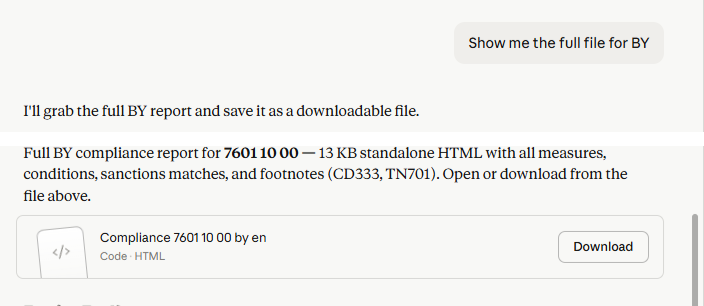
The strongest AI-agent demo is when the assistant uses the MCP integration, creates a standalone HTML report, and gives the reviewer a downloadable evidence file.
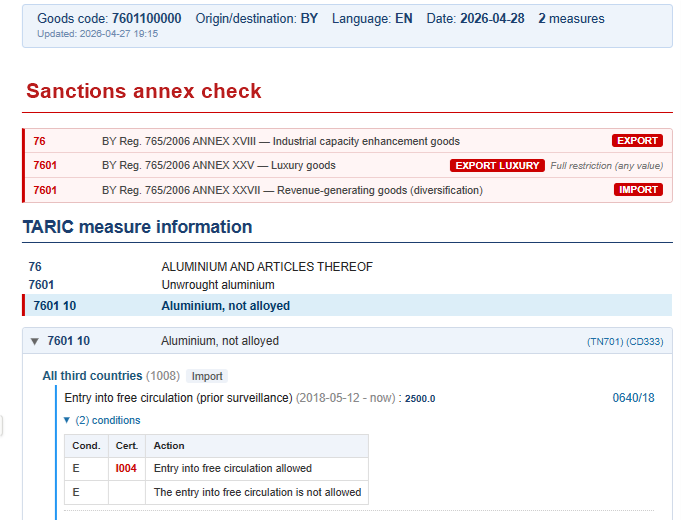
The report keeps TARIC measures, sanctions annex matches, footnotes, and warnings together.
The chat stays readable while the detailed evidence moves into the generated file.
Critical trade and regulatory decisions should be reviewed by qualified customs, legal, or trade compliance professionals and verified against official sources or competent authorities.
Session output excerpt
Readable breakdown extracted from the same session
Session transcript
Using Compliance MCP integration
Prompt
Show me the full file for BY
Response
I will grab the full BY report and save it as a downloadable file.
Used Compliance Platform MCP tools and file output
Full BY compliance report for 7601 10 00 - standalone HTML with all measures, conditions, sanctions matches, and footnotes.
BY Compliance Report — 7601 10 00 — EN
Code · HTML
BY Compliance Report — 7601 10 00 — EN · HTML
Generated report preview
Sanctions annex check
| 76 | BY Reg. 765/2006 ANNEX XVIII — Industrial capacity enhancement goods | EXPORT |
| 7601 | BY Reg. 765/2006 ANNEX XXV — Luxury goods | EXPORT LUXURY |
| 7601 | BY Reg. 765/2006 ANNEX XXVII — Revenue-generating goods | IMPORT |
TARIC measure information
Entry into free circulation
Measure 1008 · Trade context
2500.0
0640/18
Airworthiness tariff suspension
Measure 1011 · Trade context
0%
1517/18
Footnotes flagged: CD333 and TN701. The report gives the reviewer a concrete source trail, while the platform reminds users to verify critical decisions against official sources.
Open sample reportClaude workspace settings
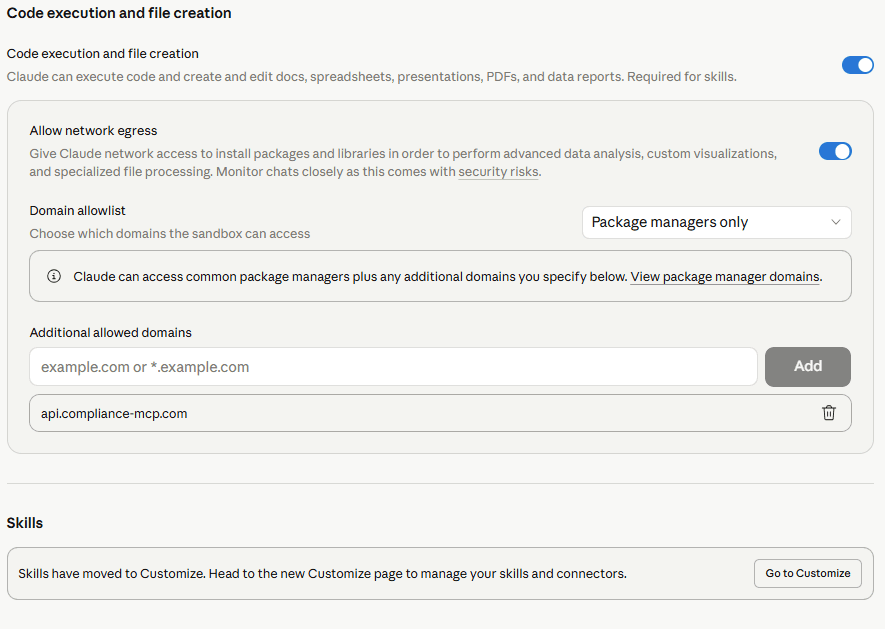
Recommended Claude settings for working with platform data.
If an AI assistant is used to work with Compliance Platform data, technical reviewers should know where network access, skills, and connector behavior are configured.
Use a narrow domain allowlist when the assistant needs network access to platform data.
Allow `api.compliance-mcp.com`; avoid broad wildcards unless there is a clear operational reason.
Skills configuration is a good place to keep the agent behavior explicit and reviewable.
Connectors can also be managed from the workspace Customize settings, depending on the UI.
Compliance skill instructions
Recommended prompt for the AI workspace
Role
Core rules
Tool routing
Output style
Prompt examples
Real prompts from the setup guide, mapped to agent behavior.
These examples are taken from Part 1 of the MCP setup guide. The important part is not the wording itself, but the routing: the agent should call the platform tool and return evidence.
Classification and duties
Agent prompt
“Check CN code 8504403000 for an EU trade review with China. I need the duty rate, measures, and any conditions.”
Expected result
Measures, duty rates, conditions, warnings, and legal basis for review.
Product description
Agent prompt
“Find the CN code for hydraulic pump components — I have a product description, not a number.”
Expected result
Candidate CN codes with hierarchy context before the user runs a full check.
Sanctions screening
Agent prompt
“Run a sanctions check for CN 8471300000 from Russia. Show direct and group-level matches separately.”
Expected result
Direct matches and broader group-level matches separated for review.
Full compliance check
Agent prompt
“Generate a compliance report for 8702109090 · Turkey · date 2026-03-15. I need the HTML file.”
Expected result
Full compliance result with measures, warnings, source context, and report output when available.
Classification overview
Agent prompt
“What does CN code 0302120010 cover? I only need the classification hierarchy, no measures.”
Expected result
CN hierarchy and selected code description before any country-specific compliance check.
User control
The user asks normal questions; the agent handles routing and evidence collection.
Organization access
API/MCP credentials are scoped to the workspace and can be reviewed or rotated.
Evidence output
For detailed answers, the agent links to a generated HTML report instead of relying on chat text.